




Small Business SEO: 11 Steps That Actually Get You on Page 1
If you run a small business, you already know the feeling: your website looks great, your products or services are solid, but Google acts like you don’t exist. You’re not alone. Most small business owners try small business SEO for a few weeks, see no movement, and give up. The truth is, SEO for a small business isn’t about doing everything at once, it’s about doing the right eleven things, in the right order, consistently. Below is the exact roadmap we use, including a real speed issue we caught and fixed on our own site (more on that in step 6).

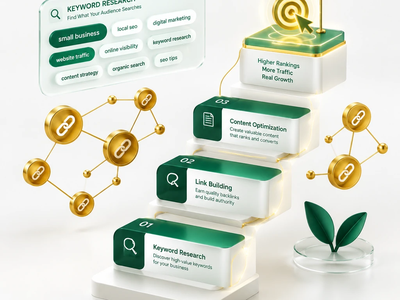
1. Start With a Google Business Profile, Not Just a Website
Before touching a single line of code, claim and fully optimize your Google Business Profile. Add accurate NAP (Name, Address, Phone), pick the right business categories, upload real photos, and respond to every review. For local businesses, this single step often moves the needle faster than anything else accurate. For local businesses, this single step often moves the needle faster than anything elseMoz, and HubSpot is a losing battle on a new or small domain. Instead, look for keywords with real intent and manageable competition, things like “local seo marketing agency” or “wordpress maintenance services” instead of broad, saturated terms. Volume matters less than whether you can realistically compete.
2. Do Keyword Research With Realistic Intent
Most small business owners doing small business SEO make the same mistake: they target keywords that are too broad or too competitive. “Plumber” or “bakery” won’t move the needle — the businesses ranking for those terms have years of domain authority and serious budgets behind them.
The foundation of effective small business SEO is targeting long-tail, intent-driven keywords that match what your actual customers type when they’re ready to act. Generic terms won’t convert; specific ones will.
Here’s a simple small business SEO keyword framework to follow:
- Location + service: “emergency plumber in Austin” or “wedding cake bakery in Portland”
- Problem-based: “why is my pipe leaking” or “gluten-free birthday cake near me”
- Comparison/decision stage: “best HVAC company in [city]” or “[service] cost in [city]”
Use free tools like Google Search Console, Ubersuggest, or Google autocomplete to find what people are already searching for in your niche — these are essential for any small business SEO strategy.
Once you have a list of 10–15 realistic keywords, map each one to a specific page on your site. A common small business SEO mistake is trying to rank one page for everything — that’s how you end up ranking for nothing.
3. Map One Keyword to One Page
A common small business SEO mistake is stuffing five keywords into one service page hoping something sticks. Instead, assign each keyword its own destination: transactional keywords go to service pages, informational ones go to blog posts. This prevents keyword cannibalization and gives Google a clear signal about what each page is for.
4. Fix Your Title Tags and Meta Descriptions
Your title tag (50-60 characters) should include your main keyword close to the front, followed by your brand name. Your meta description (140-160 characters) should include the keyword plus a clear reason to click, like a free consultation or fast turnaround. These two elements directly affect your click-through rate from search results.

5. Write One Clear H1, Then Structure With H2s
Every page needs exactly one H1 containing the primary keyword. Below that, break your content into H2 sections using related terms (LSI keywords) like “seo checklist,” “on-page optimization,” or “local seo services.” This structure helps both readers and Google understand your content at a glance, and it’s often what determines whether you win a featured snippet.
6. Take Core Web Vitals Seriously
We learned this the hard way. Running a PageSpeed Insights test on one of our own pages revealed a Total Blocking Time of over 1,000 milliseconds, a serious red flag. The fix involved two things: adding fetchpriority="high" to above-the-fold images, and enabling Critical CSS through our caching plugin to eliminate render-blocking styles. Within days, both TBT and CLS improved noticeably. If your site feels sluggish, this is likely costing you rankings right now.
7. Build Internal Links Like a Web, Not a List
Every service page should link to at least two or three related pages, and every blog post should link back to relevant services. This distributes authority across your site and keeps visitors (and Google’s crawlers) moving deeper instead of bouncing after one page.
8. Optimize Images the Right Way
Convert images to WebP, add descriptive alt text that includes context (not just the keyword stuffed in), and lazy-load anything below the fold. This alone can shave meaningful weight off your page load time, directly supporting the Core Web Vitals fix from step 6.


9. Add Schema Markup to Every Key Page
FAQ schema, LocalBusiness schema, and Organization schema help Google display rich snippets, stars, FAQs, business hours, directly in search results. Rich results get clicked more often, even from lower positions. If you’re already using a Schema Builder tool inside your CMS, this takes minutes, not hours.
10. Earn a Handful of Quality Backlinks
You don’t need hundreds of backlinks. You need five to ten relevant ones: a guest post on an industry blog, a mention in a local business directory, a quote provided through a journalist request platform. Quality and relevance beat volume every time, and buying links will only get you penalized.
11. Track, Don’t Guess
Set up GA4, Google Search Console, and a rank tracker for your target keywords. Check indexing status, monitor which pages get impressions but no clicks (a title/description problem), and revisit this list every few weeks. SEO for a small business is not a one-time project, it’s a maintenance habit.
The Bottom Line
Small business SEO doesn’t require a massive budget or an in-house team. It requires picking realistic keywords, fixing the technical basics, structuring your content properly, and being patient, Google typically takes four to twelve weeks to reflect on-page changes. Follow these eleven steps in order, and you’ll be competing for page one spots that are actually within reach.
Ready to see where your site stands? Get a free SEO audit and we’ll show you exactly which of these 11 steps your business is missing.Ready to get started? Contact Spinoways today.